Showing posts with label gig photography. Show all posts

Monday, 2 January 2012

Man in motion

I've written before about low-light situations, and how challenging and frustrating they can be. Electronic camera noise is certainly a big contributor to low-light images turning out ugly, but there are other factors that can be detrimental to the sharpness of images, too. In this post I want to talk about motion, and how understanding two different sources of motion can produce a marked difference in image quality.
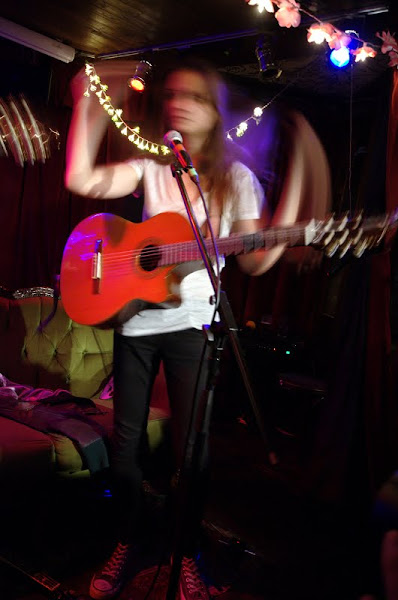

Tash of Erin K & Tash. Note that the sofa and background are reasonably sharp, but the subject is blurred.

The two sources of motion I am going to focus on are, broadly:

  • Subject motion
  • Your motion
Subject motion becomes detrimental to your picture when the subject's motion is too fast in relation to your shutter speed, and this results in blurred images, as above. For a sharp image, you're aiming to freeze time. The example in the picture above is rather extreme; normally motion blur is more subtle and can appear as a fuzziness or general lack of sharpness. The way to avoid this kind of blur is simply to increase the shutter speed at which you're shooting. I shoot a lot of singer/songwriter musicians who don't move about the stage at high velocity (thankfully!) so generally I can get away with using a shutter speed of 1/125s. If my shutter speed becomes longer than that, I risk blurred images. Of course, to have a reasonably fast shutter speed and maintain the correct exposure, the lens aperture has to be opened up. That's a great thing to do if your lens can afford that, but if you're wide open already, there are only a few other options: increase the ISO of your camera sensor (which increases noise, and softens your photo, i.e., it's detrimental) or introduce more light into the situation, i.e., raise the ambient light level in the room, or use a flash.

Your motion, more specifically meaning the motion of the camera during the exposure, can produce a similarly blurred result. This can arise in several ways: through small motions of your hand, through breathing, through being stood up or on an unstable footing, etc. This can be slightly more tricky to correct, especially if you're naturally shaky of hand or overly fond of caffeine! Blurring can be intensified as the focal length of your lens increases. With a long lens, even small motions of your hands will be amplified. With a shorter lens, this doesn't matter as much. The rule of thumb is that your shutter speed should be faster than the reciprocal of the focal length of your lens. So, if the focal length of your lens is 105mm, then you should be shooting at 1/105s at least... I would go for 1/125s. Of course, this is a rule of thumb and doesn't necessarily need to be adhered to strictly. An exception to this rule is when you have a lens which has vibration reduction (VR; Nikon lenses) or image stabilisation (IS; Canon lenses). VR compensates for your motion by up to four stops of light, meaning that if you're aiming to shoot at 1/125s, with VR you could get away with 1/15s. However, I would say that four stops of light was optimistic, and that two stops is more likely in the field. Also, VR only compensates for the motion of the photographer, not of the subject... so if you're shooting a moving subject that needs a shutter speed of 1/125s, you will still need a shutter speed of 1/125s, no matter how fancy your lens is! Other ways to reduce camera shake are to use a (good) tripod, which is not always possible or desirable, or to brace yourself or your camera against something solid, like a wall or table.

Of course, blur is not necessarily always a bad thing. Blurred portions of photographs can be used to communicate or imply motion, or to give a sense of drama. I've outlined the "rules" above, but rules are made to be broken, especially with photography. Below is an example of where the subject is moving, but her head (and most importantly, her eyes) is relatively still, and thus sharp, but her hands are moving quickly and thus appear blurred, showing that she's clapping in time to the music. I think this adds a nice effect to the photograph.
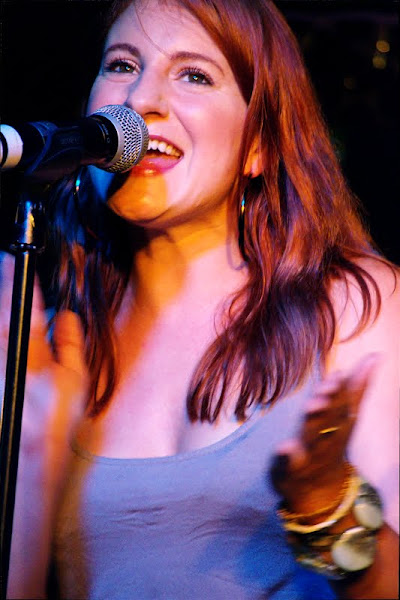

Chrissi Poland. Here blur has been used creatively to show motion.

To summarise, then: In low-light situations, noise can be a killer, but so also can motion blur. The sources of the blur which we can try to eradicate is twofold: the subject can be moving, meaning that you have to set a shutter speed fast enough to freeze time, and you can be moving, requiring you to choose a shutter speed which is relative to the length of your lens, and how steadily you are holding your camera. These two causes work together, and you should choose the faster of the two shutter speeds required to avoid blurring, e.g., if your subject's motion means that you need to shoot at 1/250s, but you think you can hand-hold your camera down to 1/100s, you should shoot at 1/250s, regardless, for crisp photographs.

Sunday, 25 September 2011

That's me in the corner

The title of this post is a little homage to one of the best bands ever, R.E.M., who announced that they were retiring this week, but the subject of this post is backgrounds, because the background of a photo can be as important as the subject or the foreground. In fact, the background of a photo can make or break a photo. I'm sure we've all seen pictures of people with palm trees or Afro-like hedges coming out of their heads, or l'enfants pis relieving themselves over the unsuspecting photo subject. Sometimes there are people in the background with weird facial expressions or doing distracting things, or there's just someone in the corner when you don't really want there to be. Pretty frustrating! Sometimes you can save things with a delicate application of Photoshop, but most of the time it's best to get things right in camera, because they can't be saved. We saw in a previous post that sometimes if you get things even a little wrong, the background can get a little invasive!

Aside from being a negative influence, a good background can be an amazingly positive thing. Check out the above image of Elena Tonra, who goes by the stage name of Daughter. Those lights in the background give a real atmosphere to the shot. For me, they give the impression of being searing heat lamps beating down on poor Elena, who is wilting a little under their oppressive rays. Imagine if they weren't there... how ordinary a picture would that be?

Yawn! In this case I changed my shooting angle (I was shooting quite low here) in order to get the lights in the frame, and that's something I've learnt to do as my experience has grown... use the background elements when you can. Especially when you've shooting live music, using the stage lighting really boosts the impact of the picture. As well as using lights, you can also use other band members as interesting backgrounds, as in this image of the band Peggy Sue:

Using the background in this way gives a greater depth to the image, and increases the amount of time you want to spend looking at an image. Always a good thing! Besides using backgrounds to add impact and to add depth, backgrounds can also add context. If you see a street scene with the Eiffel Tower peeking over the rooftops, you automatically think: Paris! If you see the Hollywood sign on the hills in the background, you think Los Angeles... and this needn't be specific to location: backgrounds can give information on all sorts of things, from weather/season to what event is happening to what mood or emotion is pervading. Particularly when you're shooting photos on a professional level, or you're hoping to sell your photos to a company or sponsor, it can be useful to include their logo or advertising in the background too... but not so much so that it dominates your subject:

So the main points here, are: when you're taking a photograph, look at the background and make sure there are no distracting elements. That's probably the most important thing, and the most frustrating thing if you get it wrong. If your background is distraction-free, then use the background to your advantage! Move yourself so that the background can add impact, re-frame the shot so that elements in the background add depth, and finally, use the information in your background location to add context to your photograph. If you can do all that, you'll have an excellent photograph regardless of the subject.

Sunday, 18 September 2011

How much wonk is too much?

One fairly frustrating thing for me when I'm photographing musicians is that they're not expressive enough. Often their lyrics say a lot, but their expressions and bodies say very little. Largely I shoot folky-type performers, and they are decidedly less expressive than, say, rock stars. And, sadly, the lighting setups for folk acts are often poor in comparison to their rock brothers'. So, to add a little dynamism I like to add a little wonk, and this is a common-used technique, which shows it works. For instance:
IronandWine31
(Photo of Iron and Wine by Auteurian on Flickr)
However, you can certainly over-cook it with adding the wonk, as my top image shows. The rule of thumb here is: If you naturally want to turn your head when you're looking at a photo, then you have bad wonk. But you'll also see that the musicians in the top photo (from a band called Eyes & No Eyes) and the Iron and Wine photo are at the same angle to the vertical... so wonk also depends on the picture. In most cases if you're heading towards an angle of 45° then you're getting perilously close to too much wonk. It helps if the focal point of your photo is higher if you have a lot of wonk... so, in the Iron and Wine photo, the guitarist's face is towards the top of the image; in my photo of Eyes & No Eyes, the focal point is Marcus' face (the guy in the white shirt), which is low in the frame, which adds to the feeling of seasickness, of being off balance.
So I managed to correct the issue by reducing the wonk (now only 30°) and moving the focal point up in the frame (to Tristram's face). Notice also now there's a nice line (perpendicular to the line of the bodies) between Marcus' eyes and Tristram's eyes, which also helps the composition.

One final thing about wonk... it's also really great for squeezing more into the frame, by utilising the diagonal. Rather than be restricted to landscape orientation (usually meaning you have to cut off somebody's legs) or portrait orientation (usually meaning you have to cut off parts of someone's guitar), using the diagonal means reducing the negatives of both options:

Of course, I've been talking about gig photography here, but adding wonk also works in other forms of photography. Just remember: don't overdo it!